WordPress Not Sending Email? Why “Sent” Does Not Mean Delivered
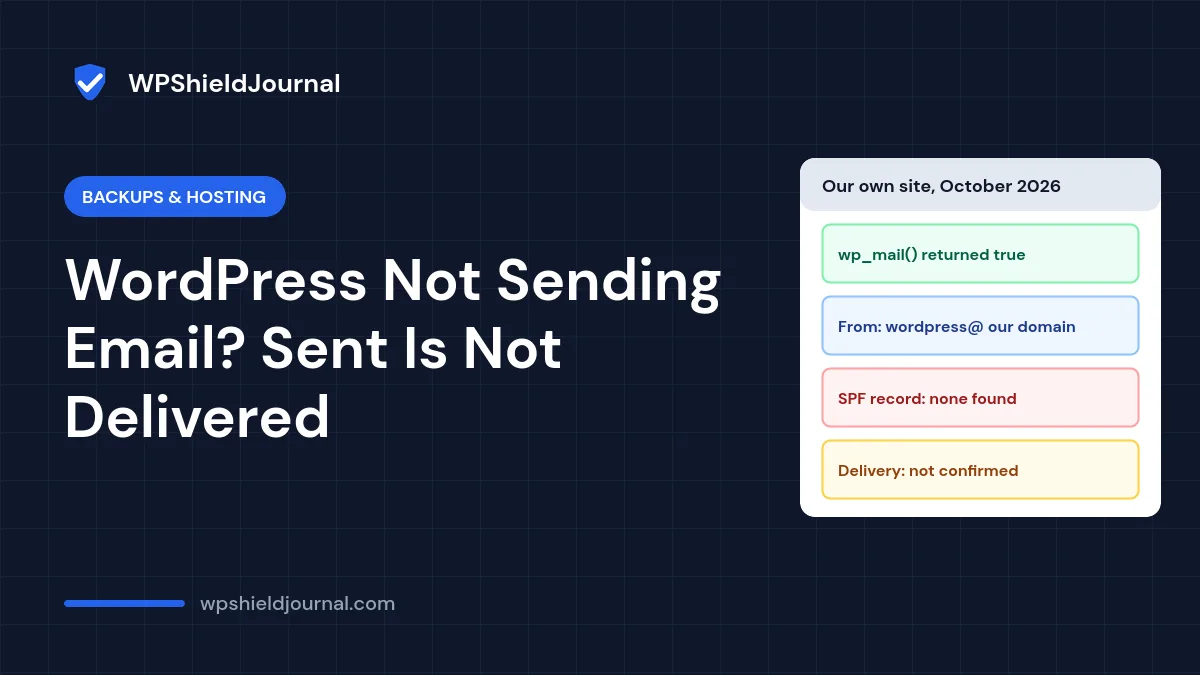
If you are dealing with WordPress not sending email, the confusing part is that nothing looks broken. Contact form plugins say “message sent”, WordPress reports no error, yet password resets and form notifications never arrive or land in spam. This guide explains where WordPress email gets lost, how to check your domain’s email authentication, and the two reliable fixes.
Quick answer: WordPress only hands email to your server; it cannot confirm delivery. Missing email authentication is a common cause of delivery problems, though not the only one. Check your domain for an SPF record (and ideally DKIM and DMARC), make sure the From address uses your own domain, and for anything important send through a real mailbox or email service with an SMTP plugin.
Why “sent” does not mean delivered
WordPress sends email with its wp_mail() function, which uses the PHPMailer library. By default PHPMailer passes the message to the web server’s own mail system. If that hand-off works, wp_mail() returns true. Everything after that point, including whether the receiving mail service accepts the message, is outside WordPress’s view.
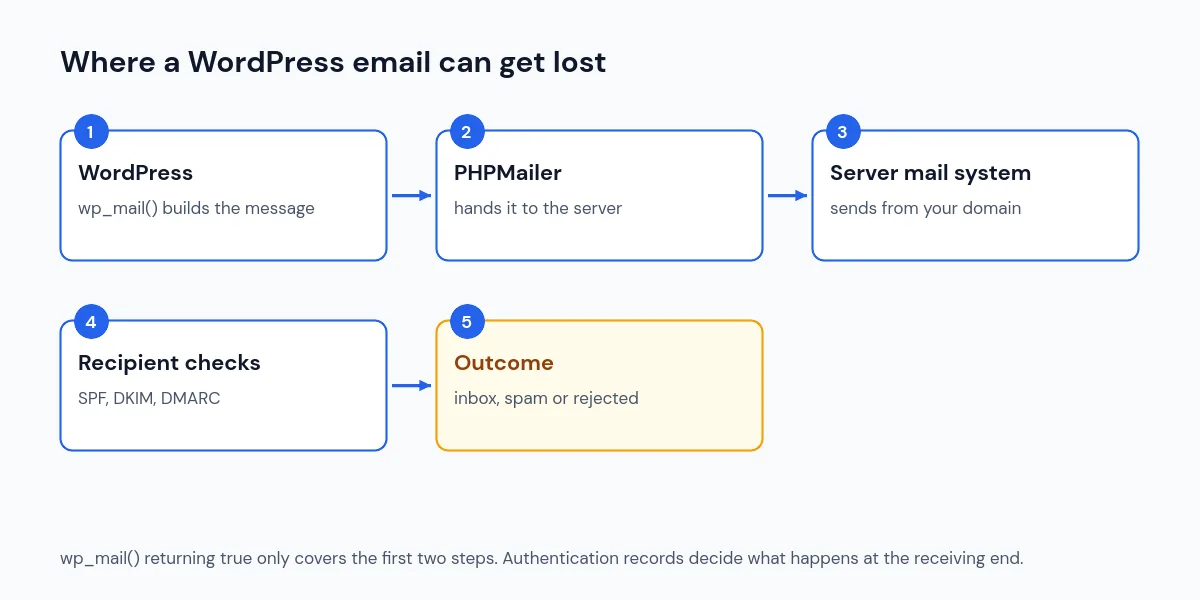
Unless you set a different address, WordPress sends from wordpress@yourdomain.com. We confirmed this in the wp_mail() code in WordPress core, which builds the address from your site’s domain and removes any www.. A source comment in that code even warns that some hosts block outgoing mail from this address if it does not exist.
What we found when testing our own site
We tested this site’s email setup while checking our contact form in October 2026. The results show why “sent” and “delivered” are separate questions:
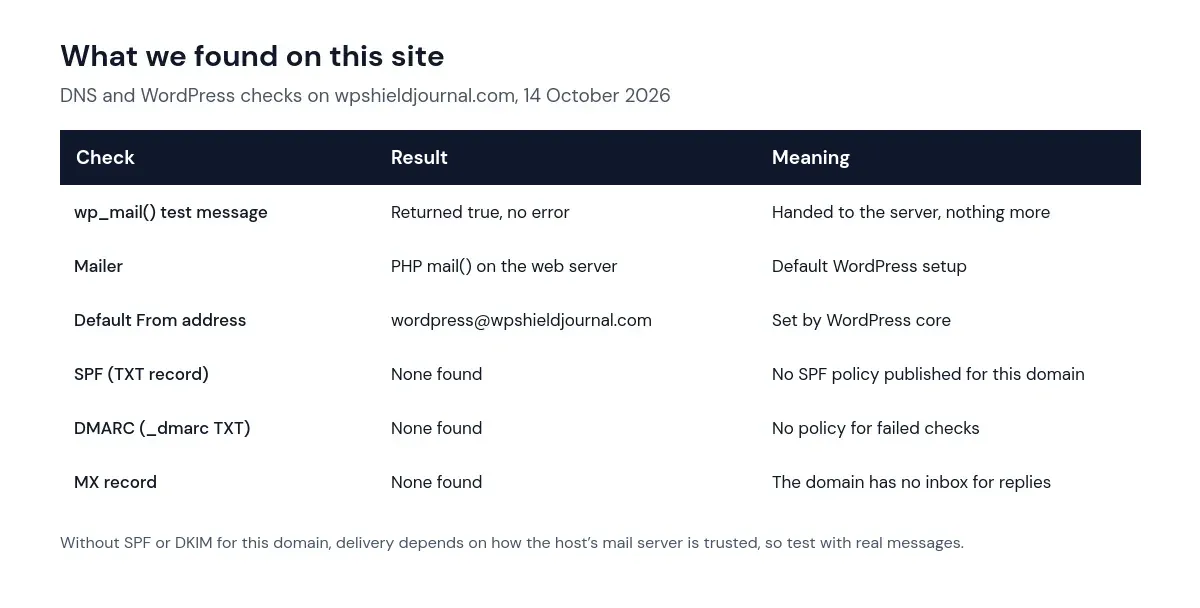
In our first tests, wp_mail() returned true and the contact form showed its success message, but we could not find the notifications in the receiving Gmail inbox. In later tests on 15 October 2026, test messages sent from wordpress@wpshieldjournal.com did arrive in Gmail, including a copy of a real contact form notification. We did not confirm a single cause for the earlier missing messages.
When we rechecked DNS on 15 October 2026, the domain still had no SPF, DMARC or MX record, and no DKIM record under the selector names we looked up. How Gmail checked the messages that did arrive would show in their full headers, which we did not inspect.
The lesson is limited: a test email reaching Gmail confirms that that message arrived. It does not guarantee inbox placement, and it does not prove that every future email, such as a password reset or a notification with links, will be delivered. Your site may be in a similar position without showing any warning, so test with real messages and read the headers, as described in Step 3.
Why missing authentication sends email to spam
Mail services check whether the server sending a message is allowed to send for the domain in the From address. The main records are:
- SPF: a DNS TXT record listing the servers allowed to send email for your domain.
- DKIM: a digital signature added to each message, verified with a public key published in DNS.
- DMARC: a DNS record telling receivers what to do when SPF or DKIM checks fail, and where to send reports.
Google’s email sender guidelines require all senders to “set up SPF or DKIM email authentication for your sending domains”, and senders of more than 5,000 messages a day must also use DMARC. A WordPress site sending from an unauthenticated domain is exactly the kind of sender those rules filter.
Step 1: Check your domain’s email records
Use any DNS lookup tool, or a terminal:
dig TXT yourdomain.com +short
dig TXT _dmarc.yourdomain.com +short
dig MX yourdomain.com +short
Look for a TXT record starting with v=spf1 and a _dmarc record starting with v=DMARC1. If they are missing, that is a likely reason for unreliable delivery, although some hosts can still get mail through without them. A domain should have only one SPF record; two SPF records cause checks to fail.
Step 2: Fix it with authentication or SMTP
There are two dependable approaches. Many sites use both.
Option A: Authenticate the server’s mail
Ask your host for the exact SPF value for their mail servers and add it as a TXT record at your DNS provider. It looks something like v=spf1 include:_spf.example-host.com ~all, but the include part must come from your host. Enable DKIM signing if your host offers it, then add a starter DMARC record such as v=DMARC1; p=none; rua=mailto:you@yourdomain.com so you receive reports before enforcing anything.
DNS changes affect all email for your domain, including any existing mailboxes. If your domain already sends email through another provider, add that provider’s servers to the same SPF record instead of replacing it.
Option B: Send through a real mailbox with SMTP
Create a mailbox on your domain (for example noreply@yourdomain.com) with your email provider, then install a reputable SMTP plugin and enter the provider’s SMTP server, port and login. WordPress then sends through a properly authenticated mail service instead of the web server. Transactional email services work the same way and add delivery logs. Make sure the From address in the plugin matches the mailbox or verified domain.
Step 3: Test delivery properly
- Trigger a real email: request a password reset or submit your contact form.
- Check the inbox and the spam folder of a Gmail or Outlook address you control.
- Open the received message and view the original headers. Look for
spf=pass,dkim=passanddmarc=pass. - If you use an SMTP plugin, check its test tool and delivery log for errors.
Other reasons for WordPress not sending email
- The host blocks or limits PHP mail. Some hosts restrict outgoing mail from scripts. Their documentation or support will say so.
- A plugin changed the From address to a Gmail or other free address. Mail claiming to be from those domains but sent from your server fails authentication.
- The form plugin is not sending at all. Check the form’s notification settings and recipient address.
- The admin email address is wrong. Check Settings → General. Recovery-mode emails for critical errors go there too.
Frequently asked questions
Do I need an SMTP plugin?
Not strictly, if your host’s mail server is properly authenticated for your domain. In practice, an SMTP plugin connected to a real mail service is the simplest way to get reliable, logged delivery.
Will changing DNS records break my website?
Adding TXT records for SPF and DMARC does not affect how your website loads. Editing or deleting other records can, so change only what you need, and note the old values first.
Why do some emails arrive and others do not?
Receivers score each message. A short password reset may pass while a form notification containing links is filtered. Authentication improves the score for all of them.
Summary
WordPress not sending email often means the message leaves WordPress fine and is rejected or filtered later, and missing SPF, DKIM or DMARC is a common reason. Check your DNS records, authenticate your sending domain or send through SMTP, and test with real messages and headers. Add an email test to your maintenance checklist so you notice failures before your visitors do.