Site Health REST API and Loopback Request Errors Explained
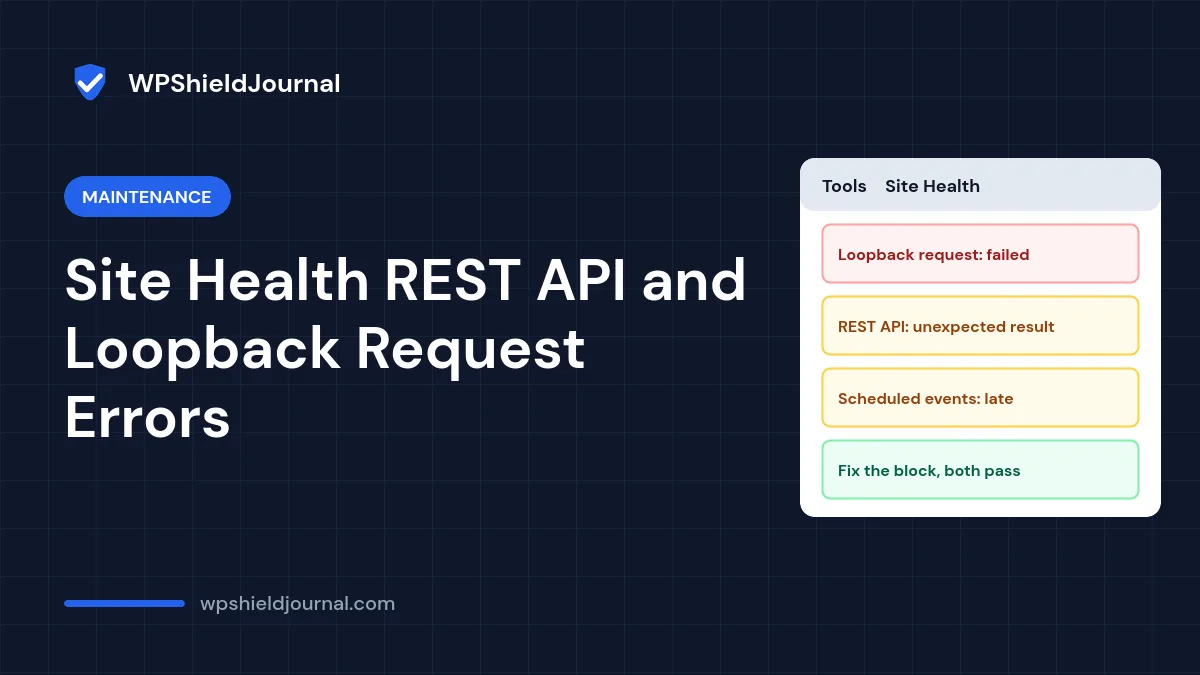
Tools → Site Health says “Your site could not complete a loopback request” or “The REST API encountered an unexpected result”. These warnings matter because scheduled tasks, the block editor and some updates depend on them, but the messages rarely say what to do. This guide explains what each test actually does, how to read the error, and the fixes that work for the common causes.
Quick answer: A loopback request is your server calling its own website. It fails when a firewall, security plugin, password protection or DNS problem blocks that call, or when the site is too slow to answer within 10 seconds. The REST API test fails when something blocks /wp-json/ or does not accept your login cookies. Read the error code in the Site Health details, then allow the server’s requests to itself, fix the blocking plugin, or close the PHP session that a plugin left open.
What the loopback request and REST API tests do
We read both tests in WordPress core (wp-admin/includes/class-wp-site-health.php) on this site. They are simpler than their names suggest:
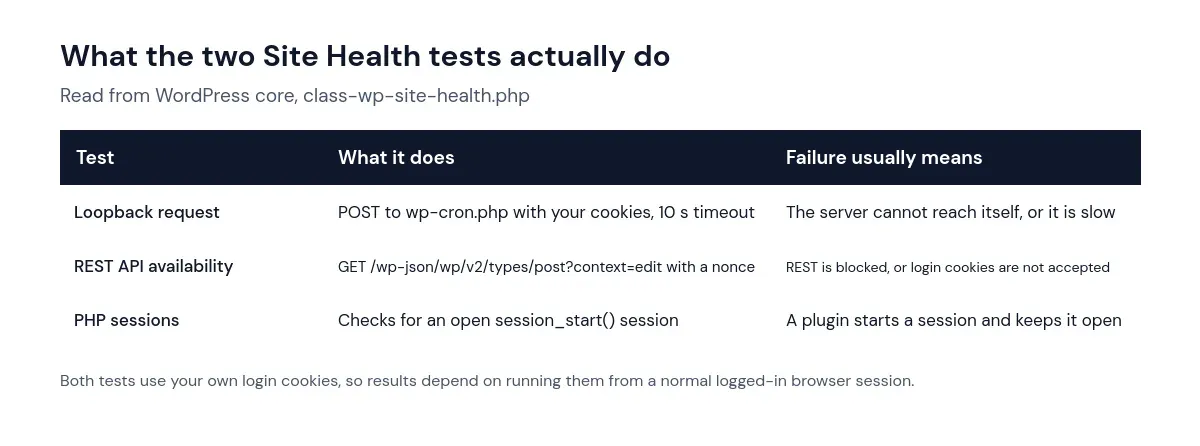
WordPress needs loopback requests to run scheduled tasks (WP-Cron) and to check for errors after you edit plugin or theme code. The block editor loads and saves content through the REST API, so a blocked REST API usually shows up as an editor that will not load or save. In the editor this often appears as Updating failed: the response is not a valid JSON response.
Step 1: Read the exact error in Site Health
Open Tools → Site Health (described in the official Site Health documentation), expand the failing item, and note the details. The description usually includes an HTTP status code or a cURL error, and for the REST API test, the URL it tried and the response it got. That detail tells you which cause applies:
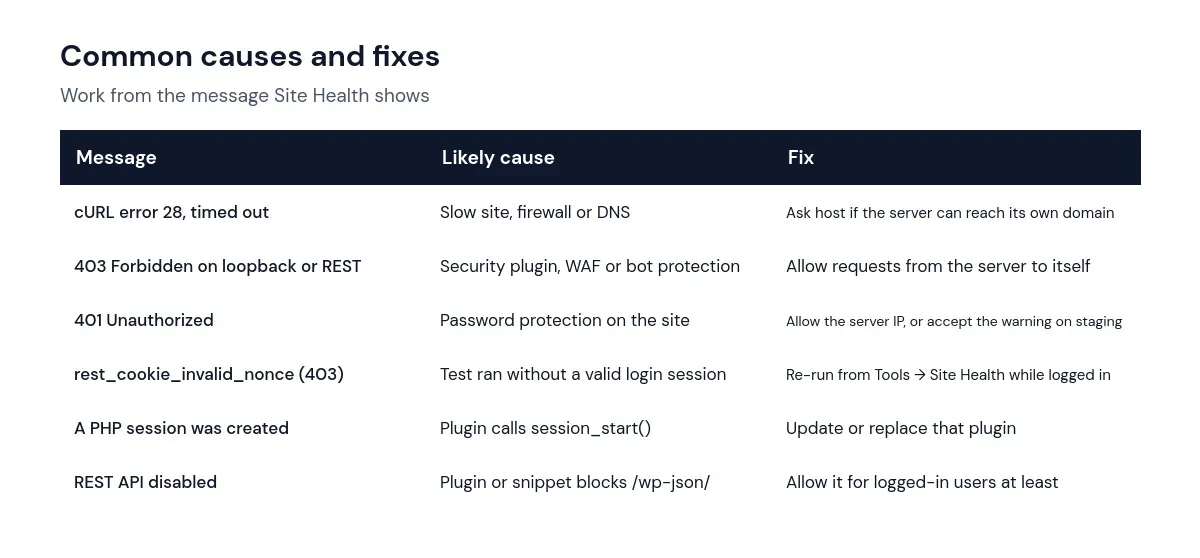
Step 2: Fix the most common causes
A security plugin or firewall blocks the server
Security plugins, web application firewalls and bot protection services sometimes treat the server’s request to itself as suspicious. Temporarily disable the security plugin on a staging copy and re-run Site Health. If the warning disappears, look for a setting that allows requests from the server’s own IP address, or ask the plugin developer. With an external firewall or CDN, ask your host or provider to allow the server to reach its own domain.
The site is password protected
Staging sites are often protected with a password at server level. The loopback test sends the browser’s basic authentication details along if PHP can see them, but many setups do not pass them through, so the request gets a 401 response. On a staging site this warning is expected and harmless; on a live site, remove the protection or allow the server’s IP address.
The site is too slow or cannot resolve its own domain
A cURL error 28 means the request timed out. The loopback test waits 10 seconds. A very slow uncached page, an overloaded server, or a server that cannot resolve its own domain name (common just after a DNS change) all cause it. Check the site’s speed using our slow site guide and ask your host whether outgoing requests to the site’s own domain work from the server.
A plugin left a PHP session open
Site Health has a separate check for this: “A PHP session was created by a session_start() function call. This interferes with REST API and loopback requests.” The fix belongs in the plugin, which should close the session with session_write_close(). Update the plugin or find it with the halving method in our plugin conflict guide.
A plugin or snippet disables the REST API
Some privacy and security plugins offer to disable the REST API. Turning it off for everyone breaks the block editor. If you want to limit it, allow it at least for logged-in users.
A false alarm we hit on this site
When we ran the REST API test from a server-side script on this site, outside a normal browser session, it reported a 403 with the code rest_cookie_invalid_nonce (“Cookie check failed”). That happened because the test relies on the logged-in user’s cookies and nonce, which our script did not have. The public REST API responded normally, and the loopback test passed. If you see this code, re-run the test from Tools → Site Health in a normal logged-in browser before investigating further. If it persists there, a plugin or cache may be stripping login cookies from REST requests.
Do not work around these warnings by disabling Site Health checks. A failing loopback test means scheduled tasks may not run, which can quietly stop backups, update checks and scheduled posts. See our guide to missed schedule and WP-Cron.
How to confirm the fix
- Re-run Tools → Site Health in a normal logged-in browser and check both tests show as passed.
- Open the block editor, change a draft and save it.
- Schedule a test post a few minutes ahead and check it publishes on time.
Frequently asked questions
Is a loopback failure dangerous?
Not directly, but it can stop scheduled tasks from running and prevent WordPress from checking your code edits for fatal errors. Fix it rather than ignore it on a live site.
Why does Site Health pass sometimes and fail other times?
Intermittent failures usually point to timeouts on a busy server, rate limiting by a firewall, or a cache serving different responses. Note the times and give them to your host.
Can a caching plugin cause REST API errors?
Yes, if it caches REST responses for logged-in users or strips cookies. Exclude /wp-json/ from page caching for logged-in requests, which most caching plugins do by default.
Summary
The loopback request and REST API tests check whether your server can talk to itself and whether the REST API accepts a logged-in request. Read the error detail, then fix the blocking firewall or plugin, the password protection, the timeout or the open PHP session. Re-run the tests from a logged-in browser to confirm, and keep the maintenance checklist handy for monthly Site Health reviews.